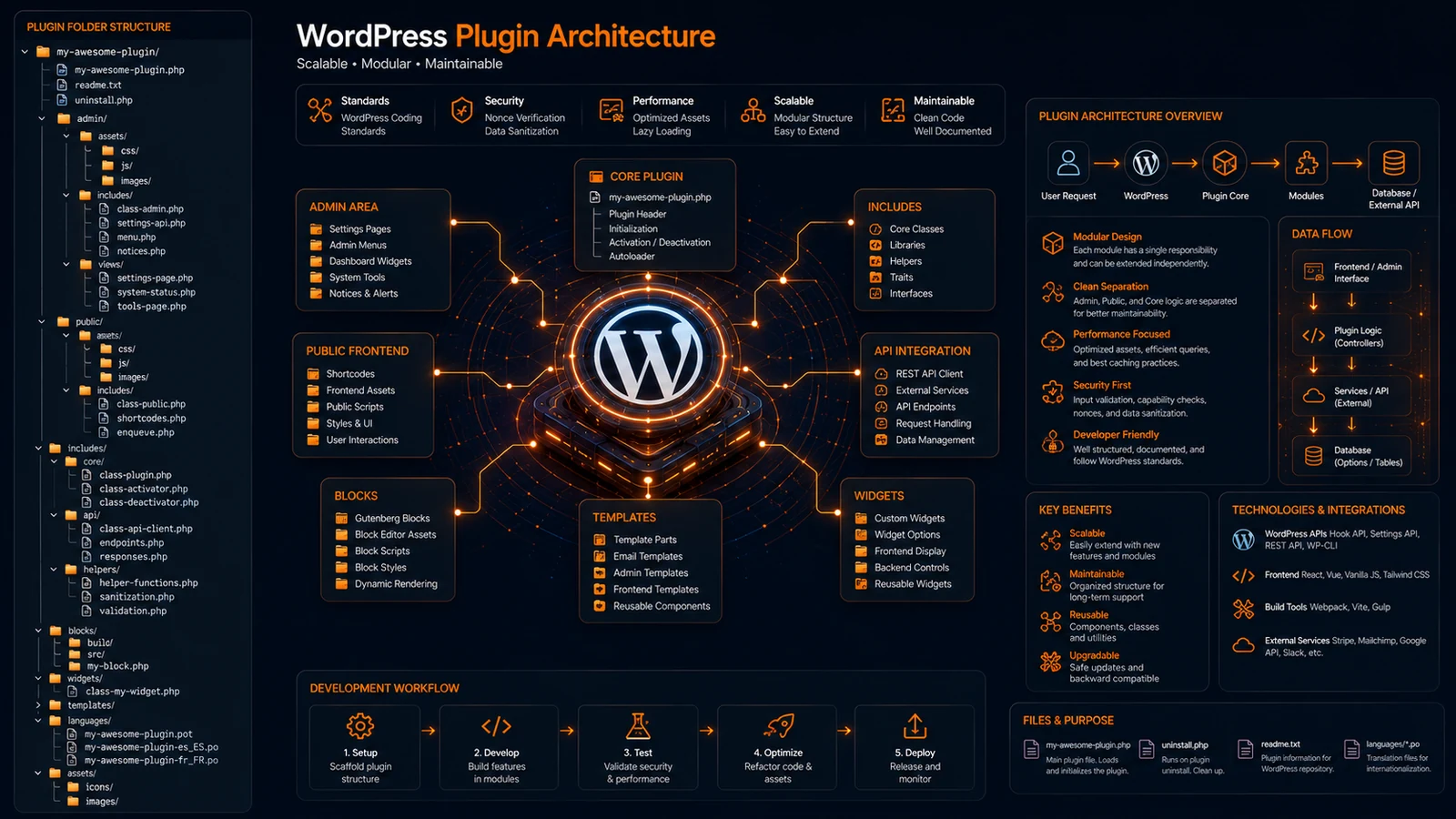
A well-organized WordPress plugin is easier to maintain, update, and scale. Yet many developers start by placing everything inside a single PHP file, only to face growing complexity as features expand.
As plugins become larger, managing admin pages, API integrations, Gutenberg blocks, assets, templates, and business logic becomes challenging without a proper architecture.
A structured WordPress Plugin Folder Structure helps developers build professional plugins that remain maintainable as they grow.
In this guide, you’ll learn how to organize plugin files effectively, avoid common mistakes, and create scalable plugin architectures used by professional WordPress developers.
Why Is WordPress Plugin Folder Structure Important?
WordPress Plugin Folder Structure defines how plugin files, assets, templates, and functionality are organized. A clean structure improves maintainability, scalability, and development efficiency.
It helps developers manage complex plugins without creating technical debt.
Why It Matters
As plugins grow:
- Features increase
- API integrations expand
- Admin settings become larger
- Code becomes harder to maintain
A proper structure prevents chaos and improves development speed.
Real Example
Popular plugins such as WooCommerce and Yoast SEO use structured architectures to manage large codebases efficiently.
What Is the Recommended WordPress Plugin Folder Structure?
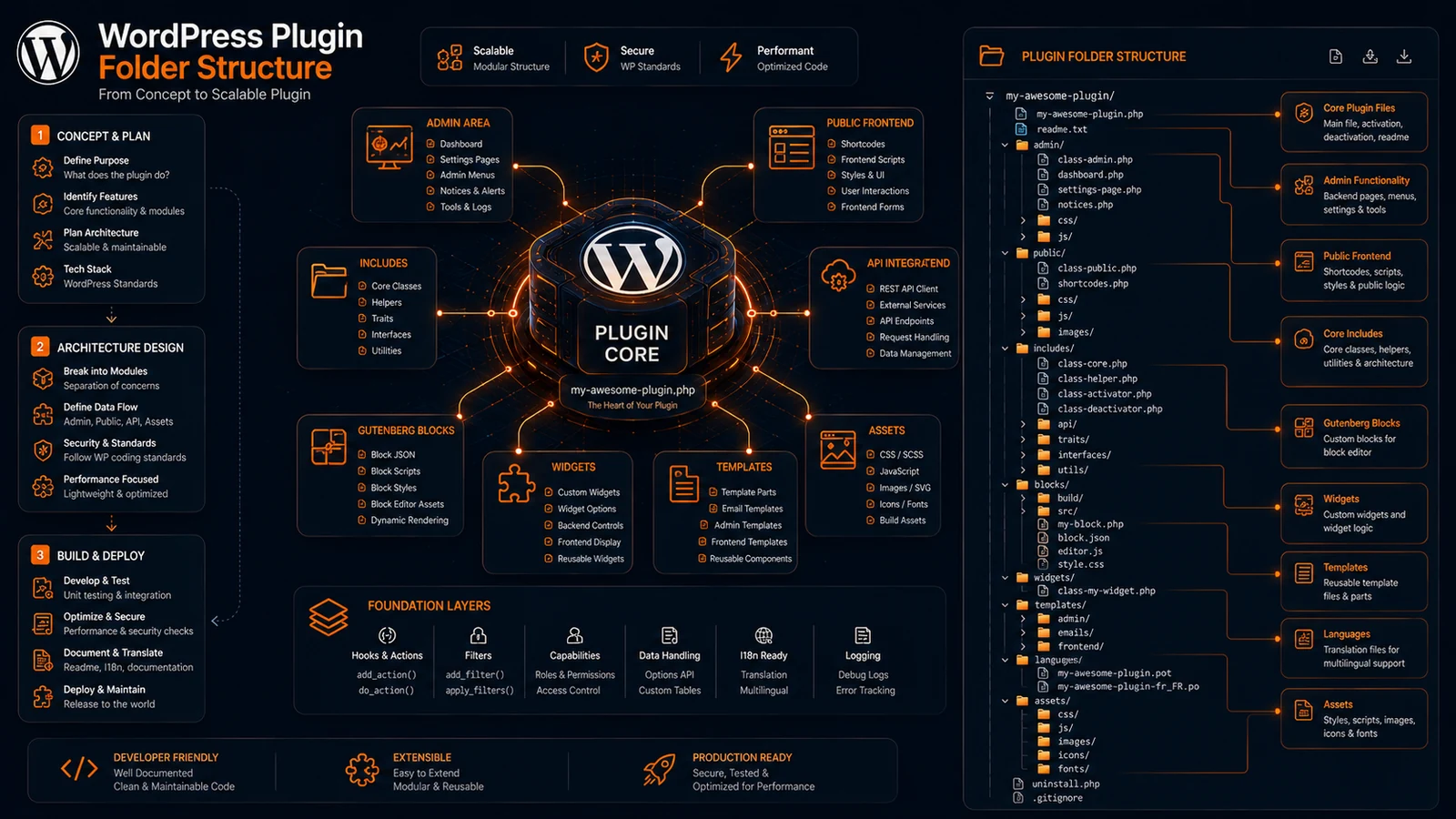
The recommended WordPress Plugin Folder Structure separates admin functionality, frontend code, assets, templates, and core logic into dedicated directories.
Recommended Structure
my-plugin/
├── admin/
├── public/
├── includes/
├── assets/
│   ├── css/
│   ├── js/
│   └── images/
├── templates/
├── languages/
├── blocks/
├── widgets/
├── uninstall.php
├── readme.txt
└── my-plugin.php
Benefits
- Cleaner organization
- Easier maintenance
- Faster development
- Better scalability
What Should Go Inside the Includes Folder?
The includes folder stores core plugin functionality, classes, helper functions, and business logic that power the plugin.
Example Structure
includes/
├── class-loader.php
├── class-activator.php
├── class-deactivator.php
├── class-api.php
├── class-settings.php
└── helper-functions.php
Why This Matters
Separating core functionality from frontend and admin code improves maintainability and keeps the plugin organized.
Best Practice
Use object-oriented programming whenever possible for larger plugins.
How Should Admin Functionality Be Organized?
Admin functionality should live inside a dedicated admin directory containing settings pages, dashboards, permissions, and backend assets.
Example
admin/
├── css/
├── js/
├── partials/
├── settings-page.php
└── dashboard.php
Benefits
Cleaner Separation
Backend functionality remains isolated.
Easier Updates
Admin features can evolve independently.
Better Security
Access controls are easier to manage.
Real Example
Membership plugins often contain extensive admin interfaces that require dedicated organization.
Where Should Frontend Assets Be Stored?
Frontend assets should be stored in a public directory with separate folders for CSS, JavaScript, and images.
Recommended Structure
public/
├── css/
├── js/
├── images/
└── partials/
Advantages
Faster Asset Management
Developers locate files quickly.
Better Performance
Assets can be optimized independently.
Cleaner Architecture
Frontend code stays separate from business logic.
How Should Gutenberg Blocks Be Organized?
Gutenberg blocks should be placed inside a dedicated blocks directory to separate editor functionality from other plugin features.
Example Structure
blocks/
├── pricing-table/
├── testimonial/
├── faq/
└── hero-section/
Benefits
Better Modularity
Each block remains self-contained.
Easier Development
Blocks can be developed independently.
Improved Reusability
Blocks can be reused across projects.
Industry Trend
Modern WordPress plugins increasingly include custom Gutenberg blocks as part of their feature set.
What Common WordPress Plugin Structure Mistakes Should You Avoid?
Common mistakes include storing all code in one file, mixing admin and frontend logic, and creating inconsistent naming conventions.
Mistake 1: Single File Plugins
Large plugins should never rely on one PHP file.
Mistake 2: Mixed Responsibilities
Keep frontend, backend, and business logic separate.
Mistake 3: Poor Naming Standards
Use consistent prefixes and file names.
Mistake 4: No Asset Organization
Separate CSS, JavaScript, and media files properly.
Result
Plugins become easier to scale and maintain.
Can AI Generate Better WordPress Plugin Structures?
Yes. AI-powered folder structure generators can create scalable WordPress plugin architectures instantly using modern development best practices.
Benefits
Faster Setup
Generate plugin structures within seconds.
Consistency
Apply the same standards across projects.
Better Planning
Start with a scalable architecture from day one.
Original Insight
Many developers spend more time organizing plugin files than building features during the early stages of development. While every plugin has unique requirements, successful plugins typically follow similar architectural patterns. Automating this setup process allows developers to focus on functionality instead of folder creation.
Expert Perspective
Programs must be written for people to read, and only incidentally for machines to execute.
— Harold Abelson, Computer Scientist
A clean plugin structure makes development easier for both current and future developers.
Conclusion
A well-designed WordPress Plugin Folder Structure improves maintainability, scalability, and development efficiency. By separating admin functionality, frontend assets, business logic, templates, and Gutenberg blocks, developers can build plugins that remain organized as they grow.
Whether you’re creating a simple utility plugin or a large SaaS integration, investing in architecture early saves time and reduces technical debt.
As WordPress development evolves, structured plugin architecture remains one of the most important foundations for long-term success.
Call to Action
Generate professional WordPress plugin folder structures instantly with ProFolderAI and start building scalable plugins faster.
Open the generator See plans & pricing →
ProFolderAI is part of PostaraAI — a suite of AI-powered tools for developers, creators, and small businesses.
About this article
- Written and maintained by the ProFolderAI team, part of PostaraAI.
- Published June 14, 2026 · Updated June 24, 2026.
- Questions or corrections? Contact the team.

Bineesh Koyente Thodika is the founder of ProFolderAI and PostaraAI. He builds AI-powered developer tools, WordPress solutions, and software products that help developers, agencies, and indie hackers launch projects faster.
Keep reading
Mastering PHP Project Structure for Efficient Development
Learn how to create a clean PHP project structure that enhances maintainability and collaboration among developers.
Vue Folder Structure: Best Practices for Scalable Apps
Vue folder structure best practices for scalable apps — how to organise components, views, stores, and composables for clean, maintainable Vue projects.
Laravel Folder Structure: Best Practices for Clean Projects
Laravel folder structure best practices — how to organise controllers, models, services, and routes for clean, scalable, maintainable Laravel applications.