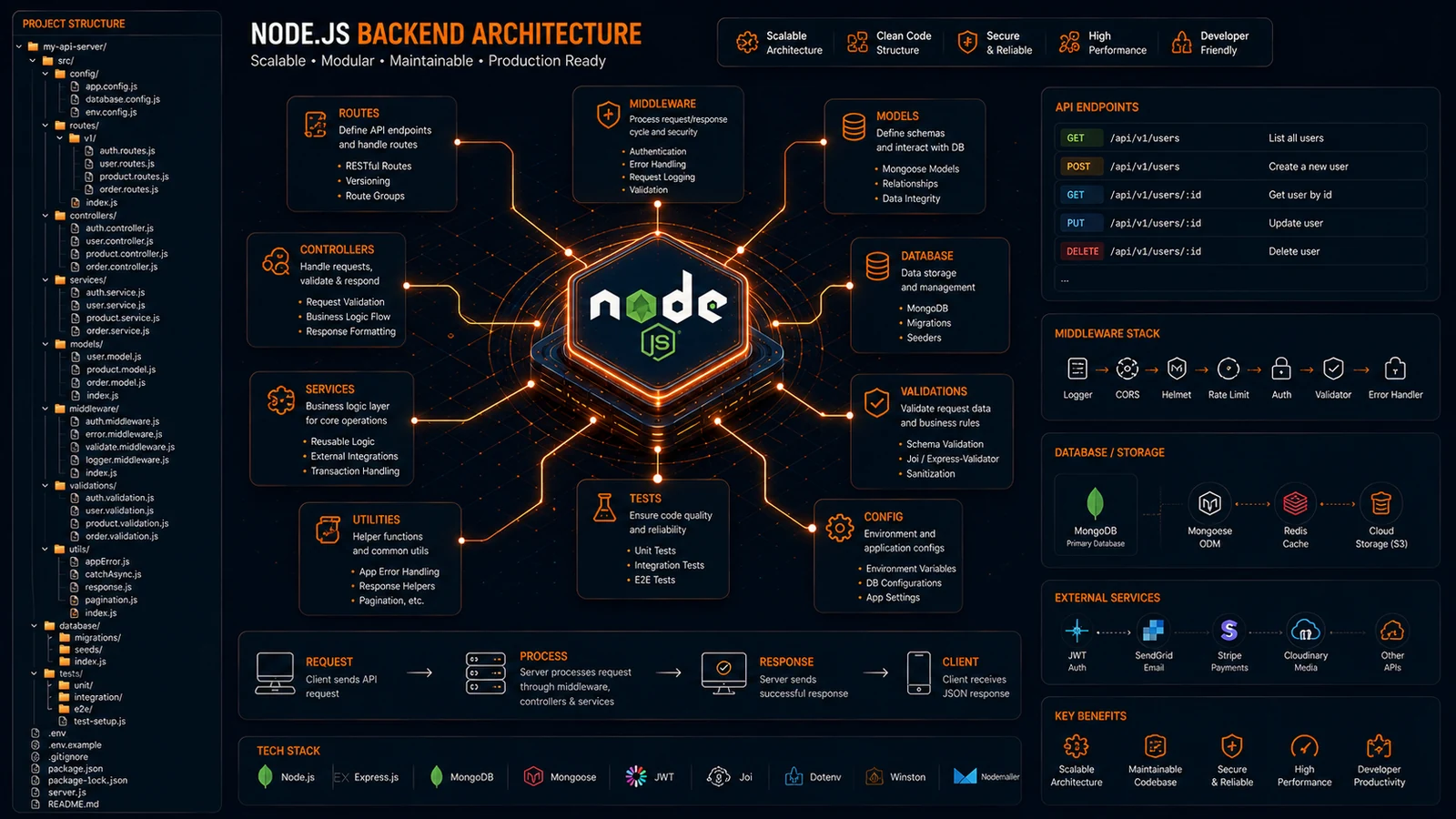
A clean Node.js Project Structure is essential for building scalable, maintainable, and production-ready applications. While small projects can survive with a few files, growing applications quickly become difficult to manage without a clear architecture.
As APIs expand and business logic becomes more complex, developers often struggle with disorganized folders, duplicated code, and difficult maintenance.
A well-planned Node.js Project Structure solves these challenges by separating concerns and creating a predictable development workflow.
In this guide, you’ll learn how to organize Node.js applications using modern best practices, improve maintainability, and create backend architectures that scale efficiently.
Why Is Node.js Project Structure Important?
Node.js Project Structure defines how backend files, APIs, services, and business logic are organized. A good structure improves maintainability, scalability, and developer productivity.
It helps teams manage growing applications efficiently.
Why It Matters
As applications grow:
- API endpoints increase
- Business logic expands
- Database operations multiply
- Team collaboration becomes more complex
Without structure, projects become difficult to maintain.
Real Example
Companies such as Netflix, PayPal, and LinkedIn use scalable Node.js architectures to support millions of users and API requests.
What Is the Recommended Node.js Project Structure?
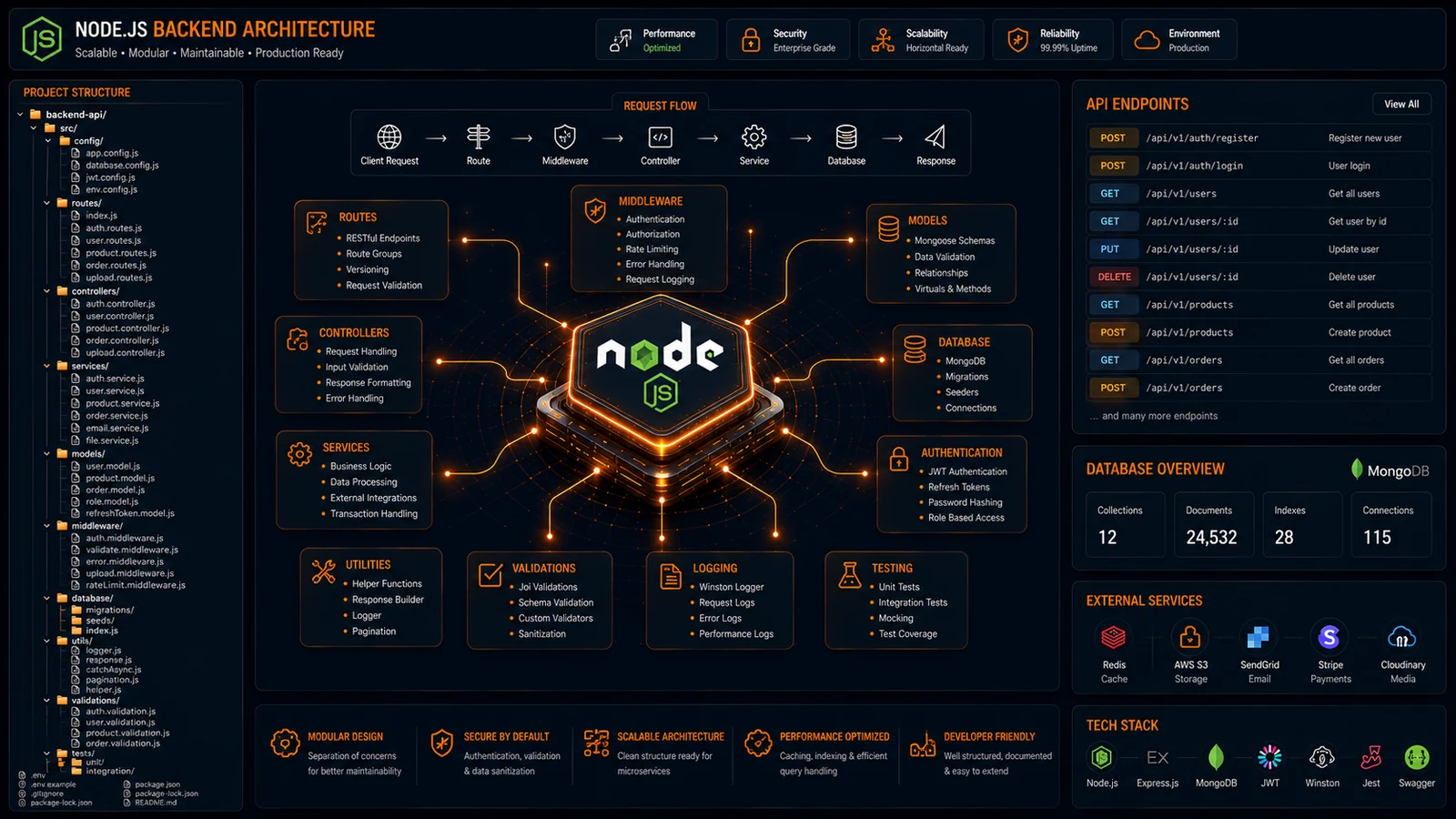
The recommended Node.js Project Structure separates routes, controllers, services, middleware, models, and configuration files into dedicated folders.
This approach improves code organization and scalability.
Recommended Structure
project/
├── src/
│   ├── routes/
│   ├── controllers/
│   ├── services/
│   ├── models/
│   ├── middleware/
│   ├── config/
│   ├── utils/
│   ├── validations/
│   └── database/
├── tests/
├── docs/
├── .env
├── package.json
└── server.js
Benefits
- Cleaner architecture
- Easier debugging
- Faster onboarding
- Better scalability
What Should Go Inside the Routes Folder?
The routes folder defines API endpoints and maps requests to controllers. It acts as the entry point for application functionality.
Example Structure
routes/
├── authRoutes.js
├── userRoutes.js
├── productRoutes.js
└── paymentRoutes.js
Why This Matters
Routes should only handle endpoint definitions and delegate business logic to controllers.
Best Practice
Keep route files lightweight and focused on routing responsibilities.
How Should Controllers Be Organized?
Controllers process incoming requests and coordinate business operations. They should remain focused on request handling rather than complex business logic.
Example Structure
controllers/
├── authController.js
├── userController.js
├── productController.js
└── paymentController.js
Benefits
Better Separation
Controllers remain focused on HTTP operations.
Cleaner Code
Business rules stay outside request handlers.
Easier Testing
Controllers can be tested independently.
Why Should Business Logic Live in Services?
Services contain business logic and application rules. Separating services from controllers improves maintainability and code reuse.
Example
services/
├── authService.js
├── userService.js
├── emailService.js
└── paymentService.js
Advantages
Reusability
Services can be used across multiple controllers.
Better Testing
Business logic remains isolated.
Cleaner Architecture
Applications become easier to understand.
Mini Case Study
A payment service can be reused by subscriptions, invoices, and checkout modules without duplication.
Where Should Middleware Be Stored?
Middleware should be stored in a dedicated middleware folder to centralize authentication, validation, logging, and security functions.
Example Structure
middleware/
├── auth.js
├── validation.js
├── logger.js
└── rateLimiter.js
Benefits
Security
Authentication remains centralized.
Consistency
Validation rules apply across routes.
Scalability
New middleware can be added easily.
Common Usage
Middleware often handles JWT authentication, request validation, and rate limiting.
How Should Database Logic Be Organized?
Database logic should be separated from controllers and services whenever possible. Dedicated database or repository layers improve maintainability.
Example Structure
database/
├── connection.js
├── migrations/
├── seeders/
└── repositories/
Benefits
Cleaner Services
Database operations remain isolated.
Easier Migration
Switching databases becomes simpler.
Better Testing
Repositories can be mocked independently.
What Common Node.js Structure Mistakes Should You Avoid?
Common mistakes include placing all code in one file, mixing business logic with routes, and creating inconsistent folder naming conventions.
Mistake 1: Large Server Files
Avoid placing application logic inside server.js.
Mistake 2: Fat Controllers
Move business logic into services.
Mistake 3: Missing Middleware Layer
Centralize authentication and validation.
Mistake 4: Poor Folder Organization
Use clear and predictable naming standards.
Result
Applications remain maintainable as they grow.
Can AI Generate Better Node.js Project Structures?
Yes. AI-powered project structure generators can create scalable Node.js architectures instantly based on project requirements and best practices.
Benefits
Faster Setup
Generate backend structures within seconds.
Consistency
Apply the same architecture standards across projects.
Better Planning
Start with a scalable foundation from day one.
Original Insight
Many backend projects begin with good intentions but become difficult to manage as features grow. Most successful Node.js applications follow similar architectural patterns regardless of industry. Automating the initial project structure removes repetitive setup work and helps developers focus on solving business problems.
Expert Perspective
Good architecture makes the system easy to understand, develop, maintain, and deploy.
— Robert C. Martin (Uncle Bob)
Project structure is one of the first architectural decisions that impacts long-term development success.
Conclusion
A well-designed Node.js Project Structure improves maintainability, scalability, and team productivity. By separating routes, controllers, services, middleware, and database logic, developers can create backend applications that remain organized as they grow.
Whether you’re building a REST API, SaaS platform, eCommerce backend, or enterprise application, strong architecture provides the foundation for long-term success.
As Node.js continues to power modern applications, structured project organization becomes increasingly important.
Call to Action
Generate professional Node.js project structures instantly with ProFolderAI and build scalable backend applications faster.
Open the generator See plans & pricing →
ProFolderAI is part of PostaraAI — a suite of AI-powered tools for developers, creators, and small businesses.
About this article
- Written and maintained by the ProFolderAI team, part of PostaraAI.
- Published June 14, 2026 · Updated June 24, 2026.
- Questions or corrections? Contact the team.

Bineesh Koyente Thodika is the founder of ProFolderAI and PostaraAI. He builds AI-powered developer tools, WordPress solutions, and software products that help developers, agencies, and indie hackers launch projects faster.
Keep reading
Mastering PHP Project Structure for Efficient Development
Learn how to create a clean PHP project structure that enhances maintainability and collaboration among developers.
Vue Folder Structure: Best Practices for Scalable Apps
Vue folder structure best practices for scalable apps — how to organise components, views, stores, and composables for clean, maintainable Vue projects.

Laravel Folder Structure: Best Practices for Clean Projects
Laravel folder structure best practices — how to organise controllers, models, services, and routes for clean, scalable, maintainable Laravel applications.