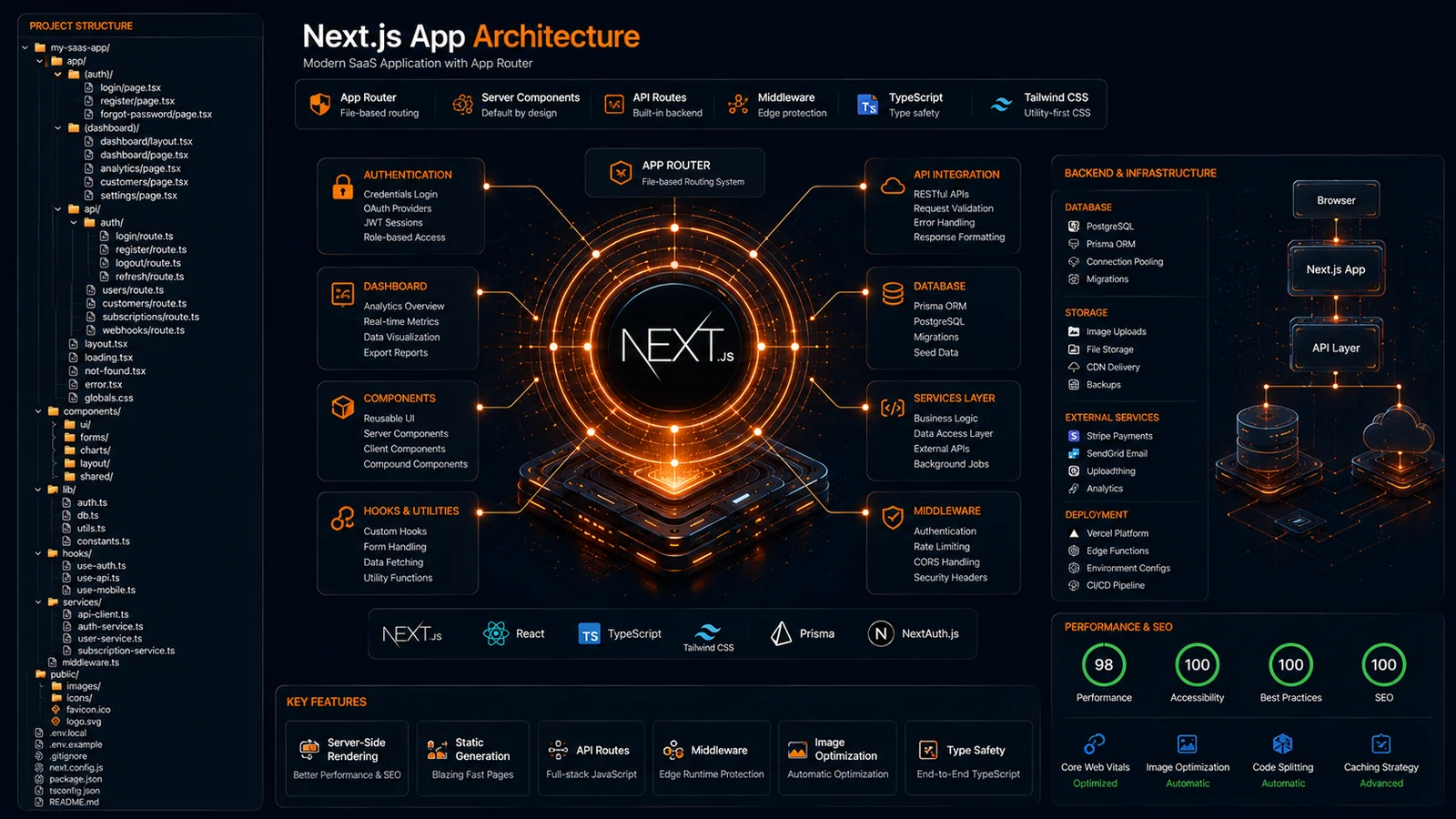
Building a successful Next.js application requires more than writing great code. As projects grow, maintaining a clean and scalable architecture becomes essential for performance, collaboration, and long-term maintainability.
Many developers start with a simple setup but quickly face challenges when components, API routes, authentication systems, and business logic begin to expand.
A well-designed Next.js Project Structure helps teams organize code efficiently, reduce technical debt, and accelerate development.
In this guide, you’ll learn the best folder organization practices, App Router architecture patterns, and scalability strategies used in modern SaaS applications.
Why Is Next.js Project Structure Important?
Next.js Project Structure defines how folders, routes, components, and business logic are organized. A well-structured project improves maintainability, scalability, and development speed.
It helps developers locate files quickly and reduce architectural complexity.
Why It Matters
As applications grow:
- More pages are added
- API routes increase
- Shared components expand
- Authentication systems become complex
Without organization, maintenance becomes difficult.
Real Example
Companies such as Netflix, TikTok, and Twitch use scalable frontend architectures to manage large-scale applications efficiently.
What Is the Recommended Next.js Project Structure?
The recommended Next.js Project Structure separates application routing, UI components, APIs, services, and utilities into dedicated directories.
This approach improves scalability and simplifies maintenance.
Example Structure
src/
├── app/
├── components/
├── hooks/
├── services/
├── lib/
├── middleware/
├── context/
├── utils/
├── types/
├── public/
└── styles/
Benefits
- Better organization
- Faster navigation
- Easier collaboration
- Cleaner architecture
How Does the App Router Change Project Organization?
The Next.js App Router uses a file-based routing system inside the app directory. Each folder represents a route and can contain layouts, pages, loading states, and server actions.
Example
app/
├── dashboard/
│   ├── page.tsx
│   ├── layout.tsx
│   └── loading.tsx
├── pricing/
│   └── page.tsx
└── page.tsx
Why Developers Prefer It
Nested Layouts
Reusable layouts reduce duplication.
Improved Performance
Server Components reduce client-side JavaScript.
Better Scalability
Route management becomes simpler.
Industry Trend
The App Router has become the standard architecture for modern Next.js projects.

Where Should Components Be Stored in Next.js?
Components should be organized based on reusability. Shared components belong in a central components folder, while feature-specific components stay close to related routes.
Recommended Structure
components/
├── ui/
├── forms/
├── dashboard/
├── navigation/
└── shared/
Best Practices
Shared Components
- Buttons
- Cards
- Inputs
- Modals
Feature Components
- Dashboard Widgets
- Pricing Tables
- User Profiles
Benefits
This structure improves discoverability and reduces duplication.
How Should API Logic Be Organized?
API logic should be separated from UI code and placed in dedicated service or API directories.
Example
services/
├── authService.ts
├── userService.ts
├── paymentService.ts
└── analyticsService.ts
Advantages
Cleaner Components
Components focus on presentation.
Easier Maintenance
API updates happen in one location.
Better Testing
Business logic can be tested independently.
Mini Case Study
A SaaS platform with multiple integrations can manage third-party services more effectively through centralized service layers.
Where Should Authentication and Middleware Live?
Authentication logic and middleware should be organized separately to improve security and maintainability.
Recommended Structure
middleware/
├── auth.ts
├── permissions.ts
└── rateLimit.ts
lib/
├── auth/
├── session/
└── permissions/Benefits
Security
Access control remains centralized.
Reusability
Authentication logic can be reused across routes.
Scalability
New security features can be added easily.
What Common Next.js Structure Mistakes Should You Avoid?
Common mistakes include placing all code inside the app directory, mixing UI with business logic, and creating inconsistent folder conventions.
Mistake 1: Large Components Folder
Avoid storing every component in one directory.
Mistake 2: Business Logic in Pages
Keep API and service logic separate.
Mistake 3: Deep Nesting
Excessive nesting makes navigation difficult.
Mistake 4: Poor Naming Standards
Use clear and consistent naming conventions.
Result
Projects remain easier to maintain as they grow.
Can AI Generate Better Next.js Project Structures?
Yes. AI-powered project structure generators can create scalable Next.js architectures instantly using industry best practices.
Benefits
Faster Setup
Generate complete projects within seconds.
Consistency
Apply the same architecture standards across multiple projects.
Better Planning
Start with a scalable structure from day one.
Original Insight
One challenge many SaaS founders face is deciding how to organize projects before development begins. While coding frameworks evolve rapidly, successful applications often share similar architectural patterns. Automating project setup removes uncertainty and helps teams move directly into product development.
Expert Perspective
Architecture represents the significant design decisions that shape a system.
— Grady Booch, Software Engineer and Software Architecture Pioneer
A strong project structure creates the foundation for scalable software architecture.
Conclusion
A well-designed Next.js Project Structure improves maintainability, scalability, and team productivity. By separating routing, components, APIs, services, and authentication systems, developers can build applications that remain organized as they grow.
Whether you’re building a startup MVP or a large SaaS platform, investing in architecture early saves significant time and effort later.
As Next.js continues to dominate modern web development, structured project organization becomes a competitive advantage.
Call to Action
Generate production-ready Next.js project structures instantly with ProFolderAI and launch your next SaaS project faster.
Open the generator See plans & pricing →
ProFolderAI is part of PostaraAI — a suite of AI-powered tools for developers, creators, and small businesses.
About this article
- Written and maintained by the ProFolderAI team, part of PostaraAI.
- Published June 14, 2026 · Updated June 24, 2026.
- Questions or corrections? Contact the team.

Bineesh Koyente Thodika is the founder of ProFolderAI and PostaraAI. He builds AI-powered developer tools, WordPress solutions, and software products that help developers, agencies, and indie hackers launch projects faster.
Keep reading
Mastering PHP Project Structure for Efficient Development
Learn how to create a clean PHP project structure that enhances maintainability and collaboration among developers.
Vue Folder Structure: Best Practices for Scalable Apps
Vue folder structure best practices for scalable apps — how to organise components, views, stores, and composables for clean, maintainable Vue projects.
Laravel Folder Structure: Best Practices for Clean Projects
Laravel folder structure best practices — how to organise controllers, models, services, and routes for clean, scalable, maintainable Laravel applications.