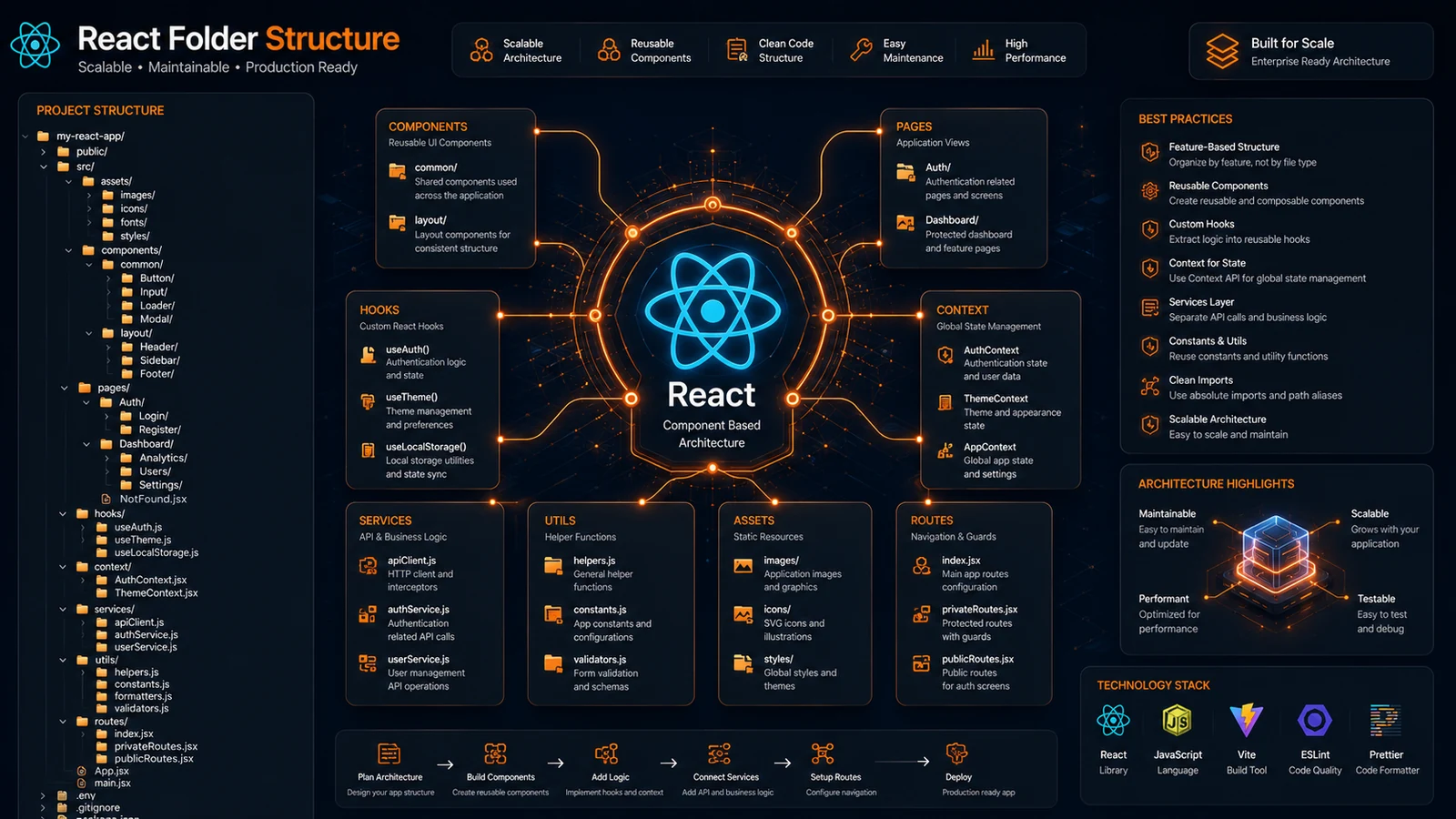
As React applications grow, maintaining a clean and organized codebase becomes increasingly important. What starts as a small project can quickly expand into hundreds of components, pages, hooks, and services.
Without proper organization, developers waste time searching for files, duplicate functionality, and struggle to maintain consistency across teams.
Following React Folder Structure Best Practices helps developers create scalable applications that remain easy to maintain, debug, and expand.
In this guide, you’ll learn proven React organization strategies, recommended folder structures, and practical techniques used by professional development teams.
Why Is React Folder Structure Important?
React folder structure determines how application files are organized. A well-structured project improves maintainability, scalability, and developer productivity.
It helps teams navigate code faster and reduce technical debt.
Why Developers Should Care
As projects grow:
- Components increase rapidly
- Shared logic becomes harder to find
- Collaboration becomes more difficult
- Maintenance costs increase
A consistent folder structure prevents these challenges.
Example
Large React applications at companies like Meta, Airbnb, and Shopify rely on organized project architectures to manage complex frontend systems.
What Is the Best React Project Structure?
The best React project structure separates concerns into dedicated folders for components, pages, hooks, services, assets, and utilities.
This approach improves readability and long-term scalability.
Recommended Structure
src/
├── assets/
├── components/
├── hooks/
├── layouts/
├── pages/
├── routes/
├── services/
├── utils/
├── context/
├── styles/
└── App.jsx
Benefits
- Easy navigation
- Cleaner architecture
- Better code separation
- Faster onboarding
How Should React Components Be Organized?
React components should be grouped based on functionality and reusability. Shared components belong in a common directory, while feature-specific components stay close to their related modules.
Best Practices
Shared Components
Examples:
- Buttons
- Inputs
- Modals
- Cards
Location:
components/Feature Components
Examples:
- UserProfile
- DashboardWidget
- ProductList
Location:
features/dashboard/components/Why This Works
Developers can quickly identify reusable versus feature-specific code.
Should You Use Feature-Based Folder Structures?
Feature-based structures organize code around business functionality rather than technical categories. This approach improves scalability for medium and large React applications.
Example Structure
src/
├── features/
│   ├── auth/
│   ├── dashboard/
│   ├── products/
│   └── users/
Advantages
Better Scalability
Each feature remains self-contained.
Easier Maintenance
Changes affect fewer files.
Faster Development
Developers work within clearly defined boundaries.
Industry Trend
Many modern React teams prefer feature-based architectures for larger applications.
Where Should React Hooks Be Stored?
Custom React hooks should be stored in a dedicated hooks folder. Organizing hooks separately improves discoverability and encourages code reuse.
Example
hooks/
├── useAuth.js
├── useFetch.js
├── useTheme.js
└── useLocalStorage.js
Benefits
- Reusable business logic
- Cleaner components
- Easier testing
Real Example
Instead of duplicating API logic across multiple pages, developers can centralize it using custom hooks.
How Should API Services Be Organized?
API services should be stored in a dedicated services directory to separate business logic from UI components.
Example
services/
├── authService.js
├── userService.js
├── productService.js
└── paymentService.js
Advantages
Cleaner Components
Components focus only on rendering.
Centralized API Calls
Updates happen in one location.
Improved Testing
Services can be tested independently.
What Common React Folder Structure Mistakes Should You Avoid?
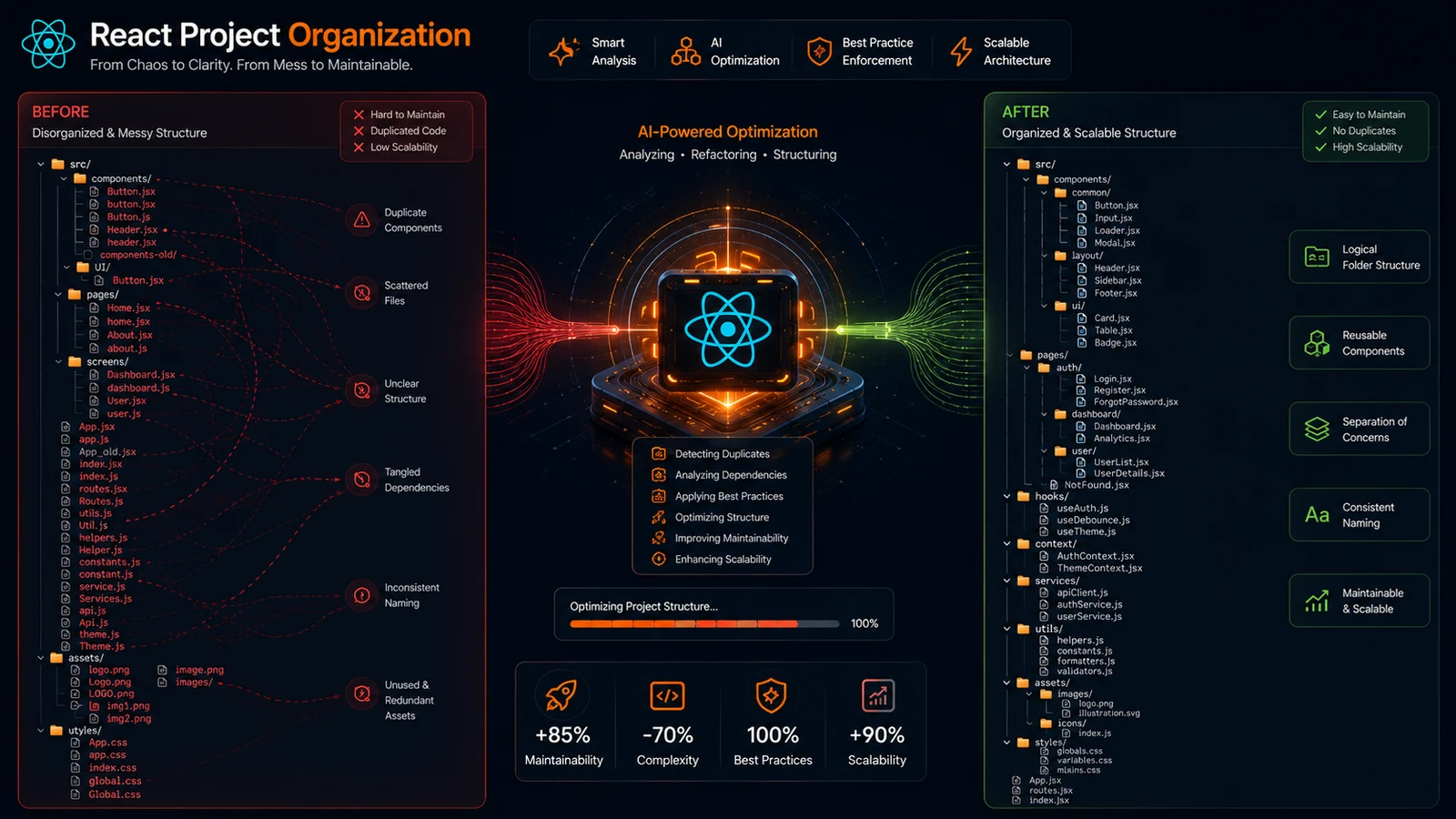
Common mistakes include placing all files in one folder, creating excessive nesting, and mixing unrelated functionality.
Mistake 1: Large Components Folder
Avoid placing every component inside a single directory.
Mistake 2: Deep Nesting
Too many nested folders make navigation difficult.
Mistake 3: Mixed Responsibilities
Keep UI, services, hooks, and utilities separate.
Mistake 4: Inconsistent Naming
Use consistent naming conventions throughout the project.
Can AI Generate Better React Folder Structures?
Yes. AI-powered tools can generate optimized React folder structures based on project requirements and industry best practices.
Benefits of AI Generation
Faster Setup
Create project structures instantly.
Consistency
Apply the same architecture standards across projects.
Scalability
Generate structures designed for future growth.
Original Insight
One challenge developers repeatedly face is deciding how to organize projects before writing code. While there is no single perfect React architecture, most successful projects follow similar patterns. Automating the setup process eliminates unnecessary planning and allows teams to focus on building features.
Expert Perspective
The best code is code that is easy to understand and maintain.
— Robert C. Martin (Uncle Bob), Software Engineer and Author
Folder organization directly affects maintainability and long-term project success.
Conclusion
Following React Folder Structure Best Practices helps developers build applications that remain organized as they grow. A clean architecture improves maintainability, collaboration, and development speed.
Whether you’re building a startup MVP or an enterprise application, investing in project organization early prevents technical debt later.
As React projects become more complex, structured architectures become essential for sustainable growth.
Call to Action
Generate production-ready React folder structures instantly with ProFolderAI and start your next project with a scalable architecture.
Open the generator See plans & pricing →
ProFolderAI is part of PostaraAI — a suite of AI-powered tools for developers, creators, and small businesses.
About this article
- Written and maintained by the ProFolderAI team, part of PostaraAI.
- Published June 14, 2026 · Updated June 24, 2026.
- Questions or corrections? Contact the team.

Bineesh Koyente Thodika is the founder of ProFolderAI and PostaraAI. He builds AI-powered developer tools, WordPress solutions, and software products that help developers, agencies, and indie hackers launch projects faster.
Keep reading
Mastering PHP Project Structure for Efficient Development
Learn how to create a clean PHP project structure that enhances maintainability and collaboration among developers.
Vue Folder Structure: Best Practices for Scalable Apps
Vue folder structure best practices for scalable apps — how to organise components, views, stores, and composables for clean, maintainable Vue projects.
Laravel Folder Structure: Best Practices for Clean Projects
Laravel folder structure best practices — how to organise controllers, models, services, and routes for clean, scalable, maintainable Laravel applications.